Inpainting missing data#
Missing data in an image can be an issue, especially when one wants to perform Fourier analysis. This tutorial explains how to fill-up missing pixels with values which looks “realistic” and introduce as little perturbation as possible for subsequent analysis. The user should keep the mask nearby and only consider the values of actual pixels and never the one inpainted.
This tutorial will use fully synthetic data to allow comparison between actual (synthetic) data with inpainted values.
The first part of the tutorial is about the generation of a challenging 2D diffraction image with realistic noise and to describe the metric used, then comes the actual tutorial on how to use the inpainting. Finally a benchmark is used based on the metric determined.
Creation of the image#
A realistic challenging image should contain:
Bragg peak rings. We chose LaB6 as guinea-pig, with very sharp peaks, at the limit of the resolution of the detector
Some amorphous content
strong polarization effect
Poissonian noise
One image will be generated but then multiple ones with different noise to discriminate the effect of the noise from other effects.
%matplotlib inline
# Used for documentation to inline plots into notebook
# %matplotlib widget
# uncomment the later for better UI
from matplotlib.pyplot import subplots
import numpy
import pyFAI
print("Using pyFAI version: ", pyFAI.version)
from pyFAI.gui import jupyter
import pyFAI.test.utilstest
from pyFAI.calibrant import get_calibrant
import time
start_time = time.perf_counter()
Using pyFAI version: 2026.9.0
detector = pyFAI.detector_factory("Pilatus2MCdTe")
mask = detector.mask.copy()
nomask = numpy.zeros_like(mask)
detector.mask=nomask
ai = pyFAI.load({"detector":detector})
ai.setFit2D(200, 200, 200)
ai.wavelength = 3e-11
print(ai)
Detector Pilatus CdTe 2M	 PixelSize= 172µm, 172µm	 BottomRight (3)
Wavelength= 0.300000 Å
SampleDetDist= 2.000000e-01 m	PONI= 3.440000e-02, 3.440000e-02 m	rot1=0.000000  rot2=0.000000  rot3=0.000000 rad
DirectBeamDist= 200.000 mm	Center: x=200.000, y=200.000 pix	Tilt= 0.000° tiltPlanRotation= 0.000° λ= 0.300Å
LaB6 = get_calibrant("LaB6")
LaB6.wavelength = ai.wavelength
print(LaB6)
r = ai.array_from_unit(unit="q_nm^-1")
decay_b = numpy.exp(-(r-50)**2/2000)
bragg = LaB6.fake_calibration_image(ai, Imax=1e4, resolution=0.1) * ai.polarization(factor=1.0) * decay_b
decay_a = numpy.exp(-r/100)
amorphous = 1000*ai.polarization(factor=1.0)*ai.solidAngleArray() * decay_a
img_nomask = bragg + amorphous
#Not the same noise function for all images two images
img_nomask1 = numpy.random.poisson(img_nomask)
img_nomask2 = numpy.random.poisson(img_nomask)
img = numpy.random.poisson(img_nomask)
img[numpy.where(mask)] = -1
fig,ax = subplots(1,2, figsize=(10,5))
jupyter.display(img=img, label="With mask", ax=ax[0])
jupyter.display(img=img_nomask, label="Without mask", ax=ax[1]);
LaB6 Calibrant with 640 reflections at wavelength 3e-11
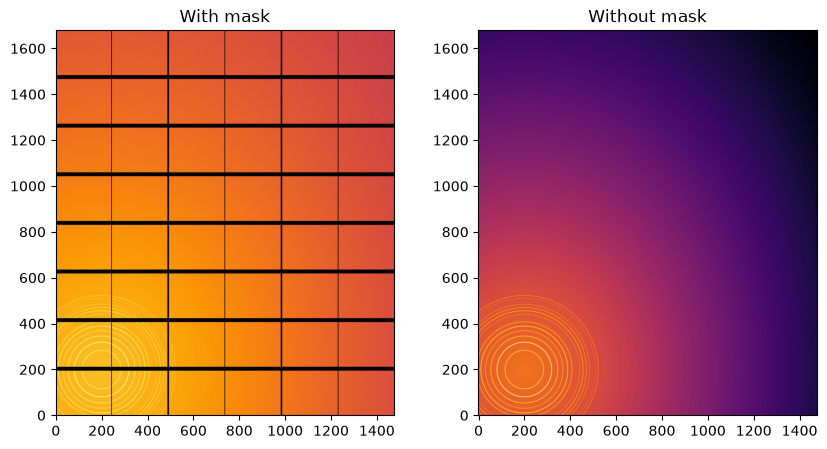
Note the aliasing effect on the displayed images.
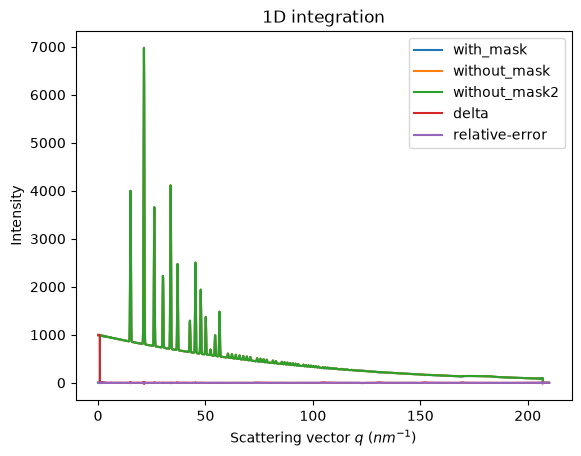
We will measure now the effect after 1D integration. We do not correct for polarization on purpose to highlight the defect one wishes to wipe out. We use a R-factor to describe the quality of the 1D-integrated signal.
kwargs = {"npt":2000, "unit":"q_nm^-1", "method":("full", "histogram", "cython"), "radial_range":(0,210)}
wo = ai.integrate1d(img_nomask, **kwargs)
wo2 = ai.integrate1d(img_nomask2, **kwargs)
wm = ai.integrate1d(img, mask=mask, **kwargs)
ax = jupyter.plot1d(wm , label="with_mask")
ax.plot(*wo, label="without_mask")
ax.plot(*wo2, label="without_mask2")
ax.plot(wo.radial, wo.intensity-wm.intensity, label="delta")
ax.plot(wo.radial, wo.intensity-wo2.intensity, label="relative-error")
ax.legend()
print("Between masked and non masked image R= {}".format(pyFAI.utils.mathutil.rwp(wm,wo)))
print("Between two different non-masked images R'= {}".format(pyFAI.utils.mathutil.rwp(wo2,wo)))
Between masked and non masked image R= 5.6764034303881985
Between two different non-masked images R'= 0.24163955484211921
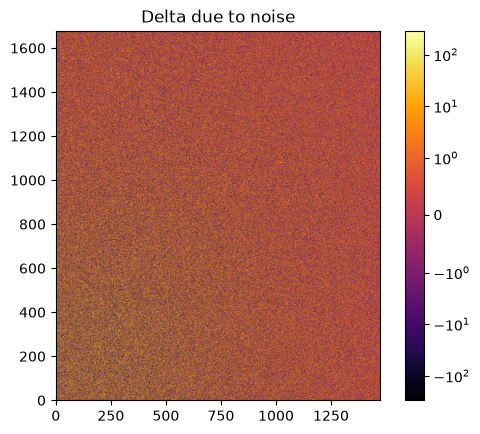
# Effect of the noise on the delta image
fig, ax = subplots()
jupyter.display(img=img_nomask-img_nomask2, label="Delta due to noise", ax=ax)
ax.figure.colorbar(ax.images[0])
<matplotlib.colorbar.Colorbar at 0x7fce441af8c0>
Inpainting#
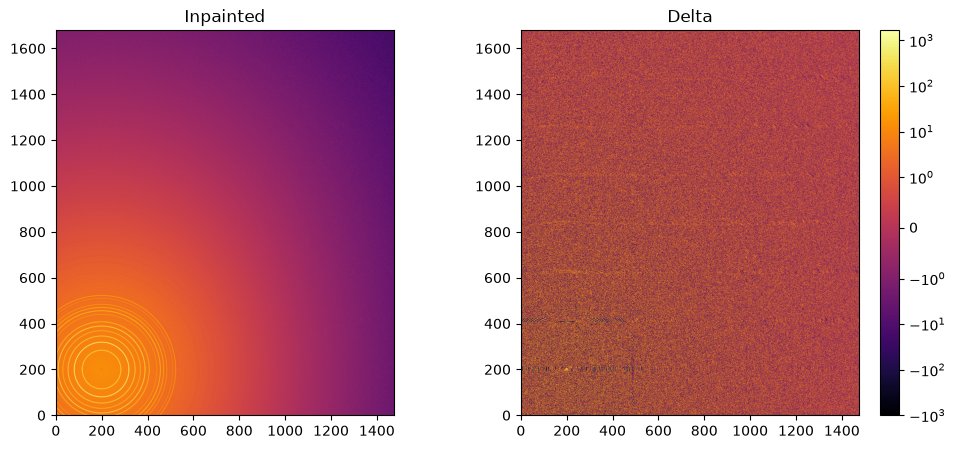
This part describes how to paint the missing pixels for having a “natural-looking image”. The delta image contains the difference with the original image
#Inpainting:
inpainted = ai.inpainting(img, mask=mask,
                          method=("no", "histogram", "cython"),
                          poissonian=True, grow_mask=3)
fig, ax = subplots(1, 2, figsize=(12,5))
jupyter.display(img=inpainted, label="Inpainted", ax=ax[0])
jupyter.display(img=img_nomask-inpainted, label="Delta", ax=ax[1])
ax[1].figure.colorbar(ax[1].images[0]);
# Comparison of the inpained image with the original one:
wm = ai.integrate1d(inpainted, **kwargs)
wo = ai.integrate1d(img_nomask, **kwargs)
ax = jupyter.plot1d(wm , label="inpainted")
ax.plot(*wo, label="without_mask")
ax.plot(wo.radial, wo.intensity-wm.intensity, label="delta")
ax.legend()
print("R= {}".format(pyFAI.utils.mathutil.rwp(wm,wo)))
R= 0.6672912065961235
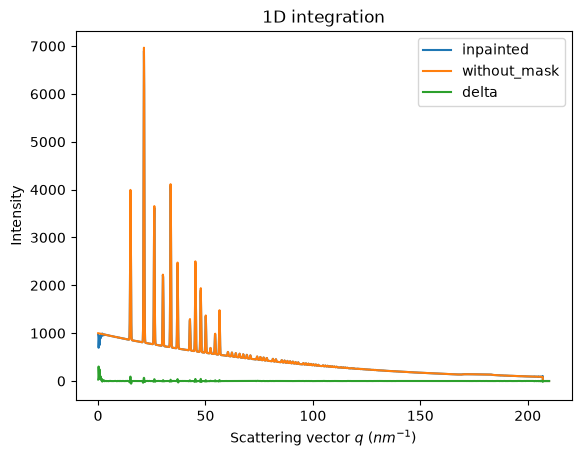
One can see by zooming in that the main effect on inpainting is a broadening of the signal in the inpainted region. This could (partially) be addressed by increasing the number of radial bins used in the inpainting.
Benchmarking and optimization of the parameters#
The parameter set depends on the detector, the experiment geometry and the type of signal on the detector. Finer detail require finer slicing.
#Basic benchmarking of execution time for default options:
%timeit inpainted = ai.inpainting(img, mask=mask)
111 ms ± 2.92 ms per loop (mean ± std. dev. of 7 runs, 1 loop each)
wo = ai.integrate1d(img_nomask, **kwargs)
R_best = numpy.finfo("float32").max
best = {}
for m in (("no", "csc", "cython"), ("bbox", "csc","cython"), ("full", "csc","cython")):
    for k in (512, 1024, 2048, 4096):
        ai.reset()
        for i in (0, 1, 2, 4, 8):
            inpainted = ai.inpainting(img, mask=mask, poissonian=True, method=m, npt_rad=k, grow_mask=i)
            wm = ai.integrate1d(inpainted, **kwargs)
            R = pyFAI.utils.mathutil.rwp(wm,wo)
            if R<R_best:
                R_best = R
                best={"method":m,
                      "npt_rad":k,
                      "grow_mask":i}
            print(f"method: {m} npt_rad={k} grow={i}; R= {R:.3f}")
print("Best configuration:", best)
method: ('no', 'csc', 'cython') npt_rad=512 grow=0; R= 2.319
method: ('no', 'csc', 'cython') npt_rad=512 grow=1; R= 0.840
method: ('no', 'csc', 'cython') npt_rad=512 grow=2; R= 0.601
method: ('no', 'csc', 'cython') npt_rad=512 grow=4; R= 0.537
method: ('no', 'csc', 'cython') npt_rad=512 grow=8; R= 0.473
method: ('no', 'csc', 'cython') npt_rad=1024 grow=0; R= 2.501
method: ('no', 'csc', 'cython') npt_rad=1024 grow=1; R= 0.925
method: ('no', 'csc', 'cython') npt_rad=1024 grow=2; R= 0.716
method: ('no', 'csc', 'cython') npt_rad=1024 grow=4; R= 0.656
method: ('no', 'csc', 'cython') npt_rad=1024 grow=8; R= 0.372
method: ('no', 'csc', 'cython') npt_rad=2048 grow=0; R= 2.772
method: ('no', 'csc', 'cython') npt_rad=2048 grow=1; R= 1.216
method: ('no', 'csc', 'cython') npt_rad=2048 grow=2; R= 1.100
method: ('no', 'csc', 'cython') npt_rad=2048 grow=4; R= 0.976
method: ('no', 'csc', 'cython') npt_rad=2048 grow=8; R= 0.741
method: ('no', 'csc', 'cython') npt_rad=4096 grow=0; R= 2.711
method: ('no', 'csc', 'cython') npt_rad=4096 grow=1; R= 1.259
method: ('no', 'csc', 'cython') npt_rad=4096 grow=2; R= 1.221
method: ('no', 'csc', 'cython') npt_rad=4096 grow=4; R= 1.184
method: ('no', 'csc', 'cython') npt_rad=4096 grow=8; R= 1.045
method: ('bbox', 'csc', 'cython') npt_rad=512 grow=0; R= 0.517
method: ('bbox', 'csc', 'cython') npt_rad=512 grow=1; R= 0.490
method: ('bbox', 'csc', 'cython') npt_rad=512 grow=2; R= 0.476
method: ('bbox', 'csc', 'cython') npt_rad=512 grow=4; R= 0.471
method: ('bbox', 'csc', 'cython') npt_rad=512 grow=8; R= 0.468
method: ('bbox', 'csc', 'cython') npt_rad=1024 grow=0; R= 0.382
method: ('bbox', 'csc', 'cython') npt_rad=1024 grow=1; R= 0.362
method: ('bbox', 'csc', 'cython') npt_rad=1024 grow=2; R= 0.359
method: ('bbox', 'csc', 'cython') npt_rad=1024 grow=4; R= 0.355
method: ('bbox', 'csc', 'cython') npt_rad=1024 grow=8; R= 0.353
method: ('bbox', 'csc', 'cython') npt_rad=2048 grow=0; R= 0.325
method: ('bbox', 'csc', 'cython') npt_rad=2048 grow=1; R= 0.310
method: ('bbox', 'csc', 'cython') npt_rad=2048 grow=2; R= 0.309
method: ('bbox', 'csc', 'cython') npt_rad=2048 grow=4; R= 0.310
method: ('bbox', 'csc', 'cython') npt_rad=2048 grow=8; R= 0.316
method: ('bbox', 'csc', 'cython') npt_rad=4096 grow=0; R= 0.317
method: ('bbox', 'csc', 'cython') npt_rad=4096 grow=1; R= 0.308
method: ('bbox', 'csc', 'cython') npt_rad=4096 grow=2; R= 0.309
method: ('bbox', 'csc', 'cython') npt_rad=4096 grow=4; R= 0.306
method: ('bbox', 'csc', 'cython') npt_rad=4096 grow=8; R= 0.314
method: ('full', 'csc', 'cython') npt_rad=512 grow=0; R= 0.524
method: ('full', 'csc', 'cython') npt_rad=512 grow=1; R= 0.476
method: ('full', 'csc', 'cython') npt_rad=512 grow=2; R= 0.477
method: ('full', 'csc', 'cython') npt_rad=512 grow=4; R= 0.475
method: ('full', 'csc', 'cython') npt_rad=512 grow=8; R= 0.474
method: ('full', 'csc', 'cython') npt_rad=1024 grow=0; R= 0.373
method: ('full', 'csc', 'cython') npt_rad=1024 grow=1; R= 0.362
method: ('full', 'csc', 'cython') npt_rad=1024 grow=2; R= 0.364
method: ('full', 'csc', 'cython') npt_rad=1024 grow=4; R= 0.351
method: ('full', 'csc', 'cython') npt_rad=1024 grow=8; R= 0.343
method: ('full', 'csc', 'cython') npt_rad=2048 grow=0; R= 1.136
method: ('full', 'csc', 'cython') npt_rad=2048 grow=1; R= 1.092
method: ('full', 'csc', 'cython') npt_rad=2048 grow=2; R= 0.891
method: ('full', 'csc', 'cython') npt_rad=2048 grow=4; R= 0.713
method: ('full', 'csc', 'cython') npt_rad=2048 grow=8; R= 0.703
method: ('full', 'csc', 'cython') npt_rad=4096 grow=0; R= 1.038
method: ('full', 'csc', 'cython') npt_rad=4096 grow=1; R= 1.011
method: ('full', 'csc', 'cython') npt_rad=4096 grow=2; R= 1.004
method: ('full', 'csc', 'cython') npt_rad=4096 grow=4; R= 1.000
method: ('full', 'csc', 'cython') npt_rad=4096 grow=8; R= 0.759
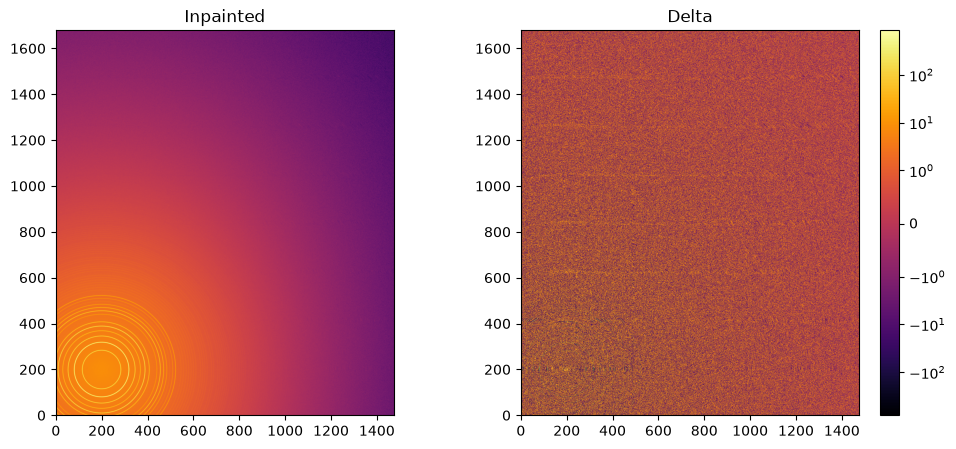
Best configuration: {'method': ('bbox', 'csc', 'cython'), 'npt_rad': 4096, 'grow_mask': 4}
#Inpainting, best solution found:
ai.reset()
%time inpainted = ai.inpainting(img, mask=mask, poissonian=True, **best)
fig, ax = subplots(1, 2, figsize=(12, 5))
jupyter.display(img=inpainted, label="Inpainted", ax=ax[0])
jupyter.display(img=img_nomask-inpainted, label="Delta", ax=ax[1])
ax[1].figure.colorbar(ax[1].images[0]);
CPU times: user 2.85 s, sys: 277 ms, total: 3.12 s
Wall time: 1.47 s
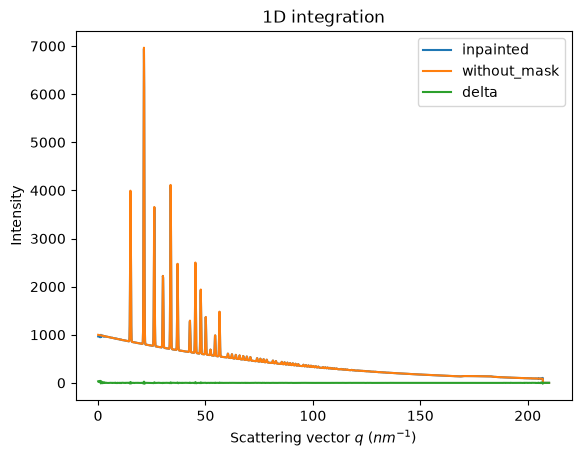
# Comparison of the inpained image with the original one:
wm = ai.integrate1d(inpainted, **kwargs)
wo = ai.integrate1d(img_nomask, **kwargs)
ax = jupyter.plot1d(wm , label="inpainted")
ax.plot(*wo, label="without_mask")
ax.plot(wo.radial, wo.intensity-wm.intensity, label="delta")
ax.legend()
print("R= {}".format(pyFAI.utils.mathutil.rwp(wm,wo)))
R= 0.3106052206498019
Conclusion#
Inpainting is one of the only solutions to fill up the gaps in the detector when Fourier analysis is needed. This tutorial explains basically how this is possible using the pyFAI library and how to optimize the parameter set for inpainting. The result may greatly vary with detector position and tilt and the kind of signal (amorphous or more spotty).
print(f"Execution time: {time.perf_counter()-start_time:.3f} s")
Execution time: 62.086 s